

Download Android Mobile Phones Bulk SMS – Send Bulk SMS from PC via Android Devices
Looking for a secure, reliable, and efficient way to send bulk SMS from your PC using your Android smartphone? Android Mobile Phones Bulk SMS is a powerful PC-based software tool that turns your Android phone into a high-capacity SMS gateway. Whether you're managing a business, organizing events, or running marketing campaigns, this software allows you to send hundreds of text messages with just a few clicks.
Designed for users who need to broadcast alerts, reminders, promotions, and greetings, it supports both national and international messaging. The software connects seamlessly to your Android device via USB or Bluetooth, enabling fast, offline communication without requiring constant internet access. With built-in contact management, template saving, duplicate number filtering, and support for non-English characters, it’s a versatile solution for personal and professional use.
Best of all, it’s easy to install, free to download, and compatible with most Android smartphones and Windows operating systems.
Send Bulk SMS from PC Using Your Android Phone – How It Works
One of the standout features of Android Mobile Phones Bulk SMS is its ability to leverage your existing Android smartphone as a messaging hub, eliminating the need for expensive SMS gateways or third-party APIs. The software connects to your Android device via USB cable or Bluetooth, allowing your PC to send messages through your phone’s SIM card. This setup is ideal for users who want to avoid recurring subscription fees while maintaining full control over their messaging campaigns. Once connected, the software automatically detects your device and displays your phone’s SMS inbox, enabling you to draft, send, and track messages directly from your computer.
Setting up the software is straightforward. After downloading the free version from the official site, install it on your Windows PC. Next, enable USB debugging on your Android phone (Settings > Developer Options), connect the device via USB, and allow the PC to access your phone’s SMS functionality.
The software will then establish a secure connection. You can now import contact lists from Excel (.xlsx), CSV, or plain text files, ensuring that large groups can be managed effortlessly. The system automatically filters out duplicate numbers, preventing wasted messages and saving time.
You can also create and save message templates for common communications like birthday wishes, appointment reminders, or promotional offers, making future campaigns faster and more consistent.
For users managing international campaigns, the software supports Unicode encoding, allowing the sending of messages in multiple languages, including Arabic, Chinese, Hindi, and Spanish. This is particularly useful for businesses with diverse customer bases. Additionally, since the software operates offline, your messages are not dependent on internet connectivity—only your phone’s network signal. This makes it ideal for areas with unstable internet or for users who prefer to keep their data private. Whether you're sending 50 messages or 5,000, the process remains simple, secure, and efficient.
Key Features That Make This Bulk SMS Tool Stand Out
Android Mobile Phones Bulk SMS comes packed with features designed to streamline mass communication. One of the most useful is the contact import and management system. You can easily load phone numbers from Excel spreadsheets, CSV files, or text documents, which the software parses and organizes into groups. This is especially helpful for businesses managing customer databases, schools sending event alerts, or NGOs coordinating volunteer teams. The software also includes a duplicate number filter, which scans your list and removes repeated entries—ensuring you don’t waste credits or annoy recipients with multiple messages.
Another major advantage is the template library. Save frequently used messages like “Thank you for your order!” or “Your appointment is confirmed for tomorrow at 3 PM” as reusable templates. This not only speeds up message creation but also maintains consistency across your communications. You can also save and view sent messages in a log, which is useful for record-keeping and compliance purposes. The software supports exclusion lists, allowing you to block specific numbers or groups from receiving messages—perfect for managing opt-outs or avoiding repeated outreach.
For multilingual users, the software supports non-English characters and Unicode encoding, enabling messages in languages like Tamil, Russian, or Japanese. This feature is often missing in basic SMS tools but is crucial for global outreach. The tool also works without an internet connection on the PC—only your Android phone needs a network signal.
This enhances security and reduces dependency on online services. Additionally, it’s compatible with most major Android devices, including Samsung, Xiaomi, OnePlus, and Google Pixel phones, ensuring broad accessibility. Whether you're using a budget phone or a flagship model, the software adapts to your setup with minimal configuration.
Installation, Compatibility & Usage Guide
Getting started with Android Mobile Phones Bulk SMS is quick and hassle-free. Begin by downloading the latest version from the official website. The software is available for free, with no hidden costs or trial limitations—just a straightforward download and installation process. Once downloaded, run the installer on your Windows PC (Windows 7, 8, 10, or 11). Follow the on-screen prompts, and the software will be ready to use in minutes.
Next, prepare your Android phone. Go to Settings > About Phone > Software Information and tap “Build Number” seven times to enable Developer Options. Then, navigate to Developer Options and turn on USB Debugging.
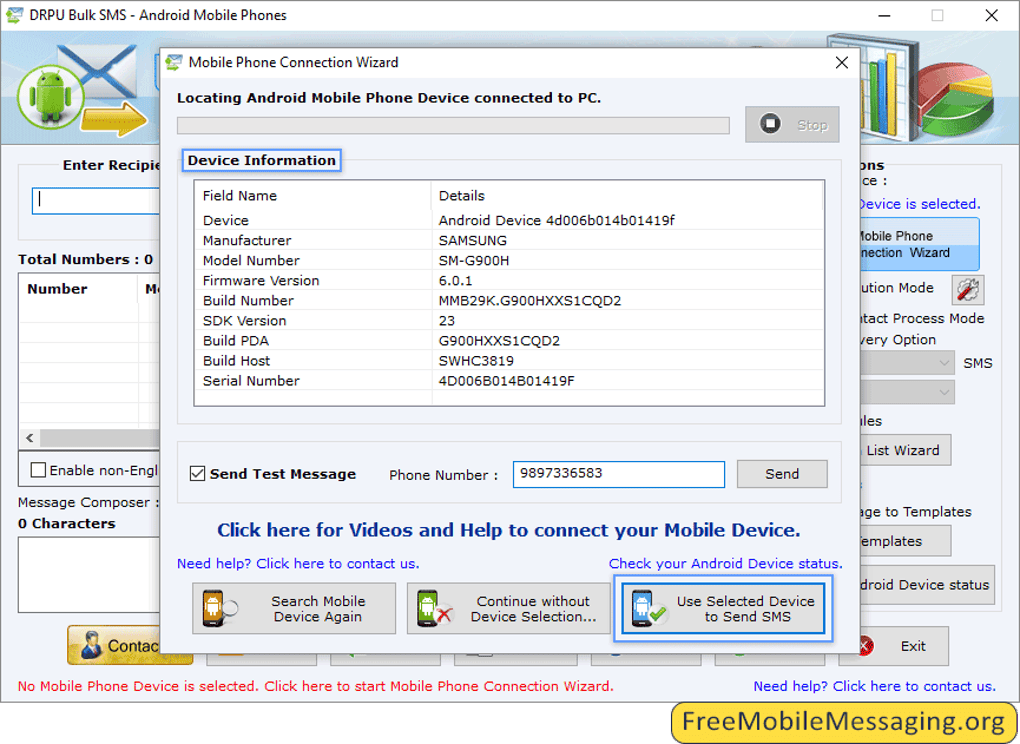
Connect your phone to the PC via USB cable. When prompted, allow the PC to access your device. The software will detect your phone and establish a secure connection.
Alternatively, you can use Bluetooth if your PC and phone support it, though USB is recommended for faster performance.
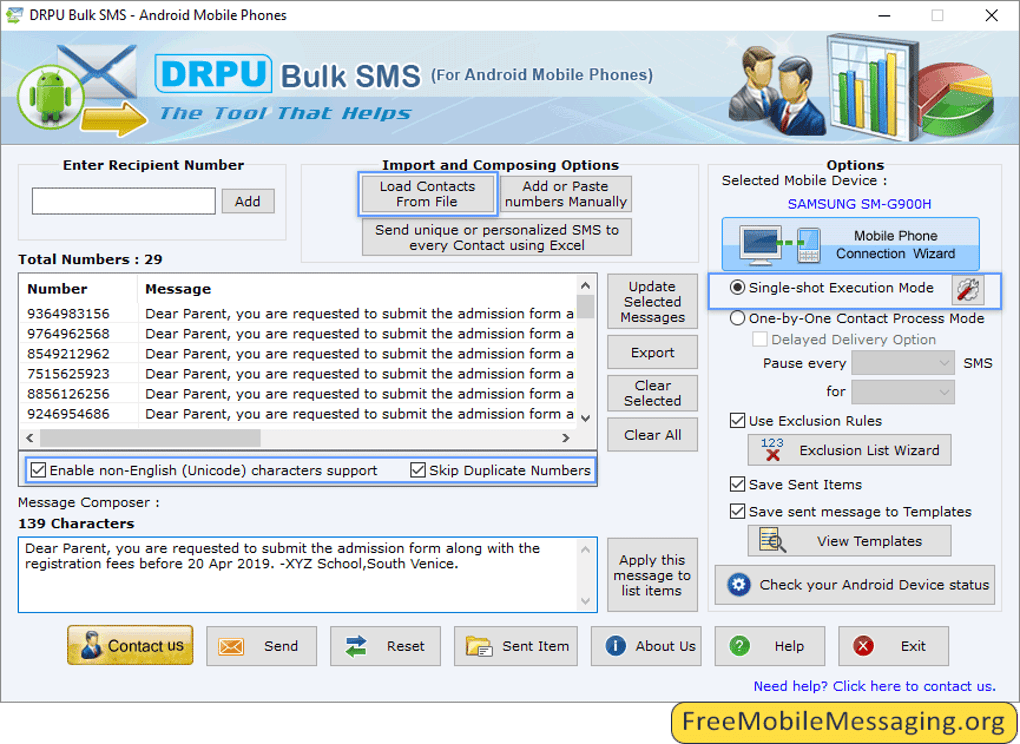
Once connected, launch the software and import your contact list. You can choose from Excel, CSV, or TXT formats. The software will guide you through mapping columns (e.g., Name, Phone Number) to ensure accurate data import.
After importing, you can organize contacts into groups, such as “Customers,” “Employees,” or “Event Attendees.” Compose your message, select the group, and click “Send.” The software handles the rest—sending messages in batches with real-time progress tracking. You can pause, resume, or stop the process at any time. For future use, save your message as a template and schedule regular campaigns with ease.
Supported Operating Systems & Devices
- Windows: Windows 7, 8, 10, 11 (32-bit and 64-bit)
- Android: All major brands (Samsung, Xiaomi, OnePlus, Oppo, Realme, Google Pixel, etc.)
- Connection Methods: USB Cable, Bluetooth (optional)
- File Formats: Excel (.xlsx, .xls), CSV, TXT
Pros and Cons: Is This the Right Bulk SMS Tool for You?
Pros
- Free to download and use with no hidden fees
- Uses your existing Android phone as an SMS gateway—no extra hardware needed
- Supports bulk messaging to national and international numbers
- Offline operation—no internet required on the PC
- Advanced contact management with Excel/CSV import and duplicate filtering
- Unicode support for non-English characters and multilingual messaging
- Template saving and message logging for efficiency and compliance
- Compatible with most Android smartphones and Windows systems
Cons
- Requires USB debugging to be enabled on Android (minor setup step)
- Only works with Android phones—no iOS or Mac support
- Dependent on your phone’s network signal and SMS credit balance
- Not a mobile app—must be used on a PC
- Advanced features may require some technical understanding
Frequently Asked Questions (FAQ)
Can I use this software with my iPhone?
No, Android Mobile Phones Bulk SMS is designed exclusively for Android devices. It connects to your Android phone via USB or Bluetooth, so it cannot be used with iPhones or other iOS devices. However, if you have an Android phone, you can leverage it as a powerful SMS tool on your PC.
Is the software free to download and use?
Yes, the software is completely free to download and use. There are no trial periods, subscription fees, or hidden charges. You can send unlimited messages as long as your Android phone has SMS credits and network connectivity.
Do I need an internet connection on my PC to send messages?
No, the software operates offline on your PC. Only your Android phone needs an active network connection to send messages. This makes it ideal for secure, private communication without relying on online services.
Can I send messages in Hindi, Arabic, or other non-English languages?
Yes, the software supports Unicode encoding, allowing you to send messages in multiple languages, including Hindi, Arabic, Russian, Chinese, and Spanish. This ensures your global audience receives your messages in their native script.
How do I import contacts from Excel?
In the software, go to the “Import Contacts” section and select your Excel (.xlsx or .xls) file. The tool will guide you through mapping columns (e.g., “Phone” and “Name”) to ensure accurate import. Duplicate numbers are automatically filtered out.
Final Verdict: A Smart, Secure, and Affordable Bulk SMS Solution
If you're looking for a reliable, cost-effective way to send bulk SMS from your PC using your Android phone, Android Mobile Phones Bulk SMS delivers exceptional value. It’s perfect for small businesses, educators, event organizers, and anyone needing to reach a large audience quickly. With its user-friendly interface, powerful features, and secure offline operation, it stands out as one of the best PC-based SMS tools available.
While it’s limited to Android devices and requires a PC, its benefits far outweigh these constraints. The ability to use your existing phone as a messaging gateway eliminates hardware costs and simplifies setup. Plus, the free download, multilingual support, and contact management features make it a top choice for both personal and professional use.
Ready to streamline your messaging? Download Android Mobile Phones Bulk SMS today and send bulk SMS with confidence, speed, and security.







